React Query
For network requests we use react queries. React query is a data fetching library that can be imported into any react application for usage. While building any react app the developers often tend to make fetch requests to the backend or some other Apis and in that case the react-query comes handy.
Why use React-query? Ok so for fetch requests we already have a fetch function . A common practice for react developers is to use useEffect hook and inside that fetch function.
For eg:
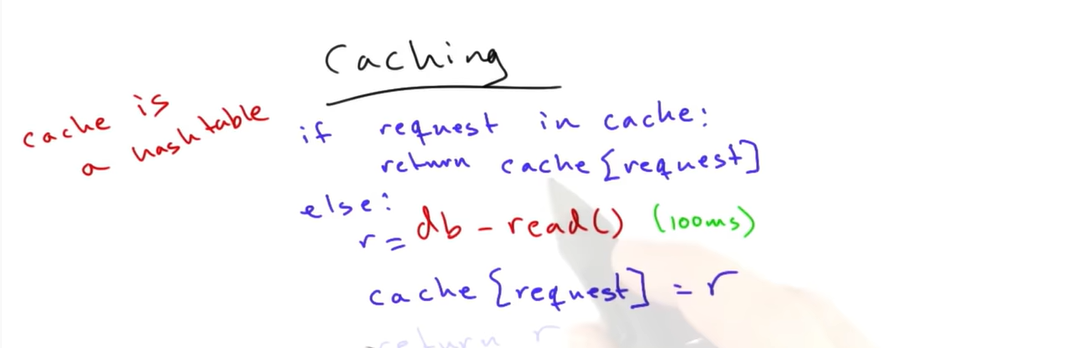
let [data,setdata]=useState(''); useEffect(()=> { fetch('./path').then(data=>return data.json()).then((res)=>setdata(res)) },[]) This is fine for calling the api or the backend but there are some inefficiencies and problems here 1)Caching the API- You use caching when you have a highly concurrent need to read the same data, or for any application that has heavy read and write. Caching is storing the result the first time so that when the data is required in future it can be accessed efficiently and speedily.
2)Polling an API- pinging the API every few seconds to know everything is working fine and the network is great.
3)Refetching the API
How to use and install react query? Ok so first in the index.js file which servers to the html file mention the following contents
Install the react-query: npm i react-query
In index.js file import { QueryClientProvider, QueryClient } from "react-query"; import { ReactQueryDevtools } from "react-query/devtools";
The QueryClientProvider is an react component which uses client as a prop
The client is an object of the QueryClient package: let client=new QueryClient();
client gives your application access to the query cache
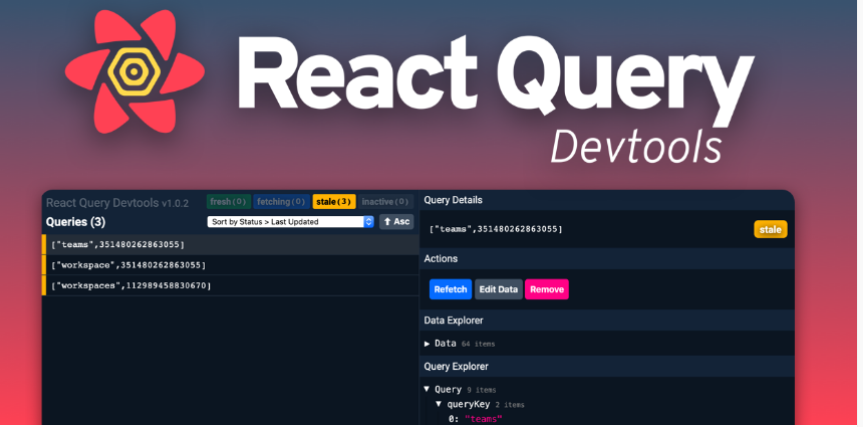
ReactQueryDevtools is a tool that helps you debug any network requests.
Writing our first program using react-query
First we need to import the useQuery hook and for that we use the following line of code
import {useQuery} from "react-query";
The useQuery hook is nothing but a function (internally all react hooks are functions only) The useQuery hook mainly has two parameters with it available. First parameter is the key that the developer passes.
React Query manages query caching for you based on query keys. Query keys can be as simple as a string, or as complex as an array of many strings and nested objects. As long as the query key is serializable, and unique to the query's data
The simplest form of a key is actually not an array, but an individual string. When a string query key is passed, it is converted to an array internally
Instead of a string you can also use an array of data. The array is used as it better describes a query data
Since query keys uniquely describe the data they are fetching, they should include any variables you use in your query function that change
For example if there is an API for blogs and your application is fetching the different blogposts then you can pass the blogid to every function and the blockid can now be used as a Query Key and the blog can be fetched based on the given id
The 2nd argument is a function which returns a resolved or rejected promise.The data from a useQuery only accepts the data that is resolved in the promise. For example fetch function is a promise which returns a resolved data and this resolved data is stored in a function
let {data}=useQuery("dhruv",()=>{fetch().then.then(return)};
//The above is a simple react query which has the query key equal to dhruv and a small function which returns a resolved promise data
Also one more thing about useEffect which is bad as compared to the useQuery hook is that in useEffect each and every component will have multiple network calls and thus this problem will be solved by react-query
React query states:
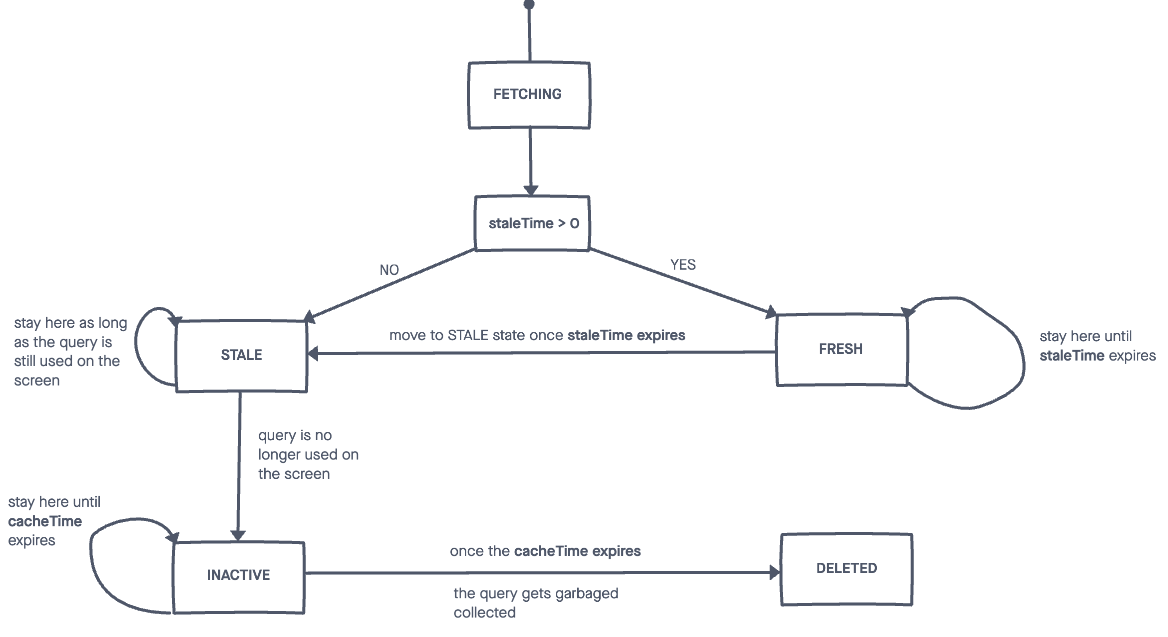
There are essentially 4 states in react query. Whenever the component which contains the useQuery hook is not mounted to the UI then the query is said to be in the inactive state
Now lets learn about the fetching and stale state. In the process when the react query is fetching the data using the fetch api in that time the query is said to be in the fetching state. Once the data is fetched it is moved to fresh state and then the stale state
This fetching and the stale state happens again and again. When you bring the website in focus it again starts fetching the data and in the meanwhile the previous cached data is shown to the user until the new data is fetched and then the state moves to the stale state. The below diagram basically sums up the query states in a excellent way:
We can also have multiple components using the same query. The number of components using the query can we obtained using the observers variable of the react query devtools
The react query keys work kind of like the useEffect dependencies that is when there is a change in the key refetching takes place
Disabling queries
Till now we have already worked with two parameters of the useQuery hook. Now lets explore the third parameter. This parameter is actually an object which has many keys available. One such key is the enabled which when false disables the query.
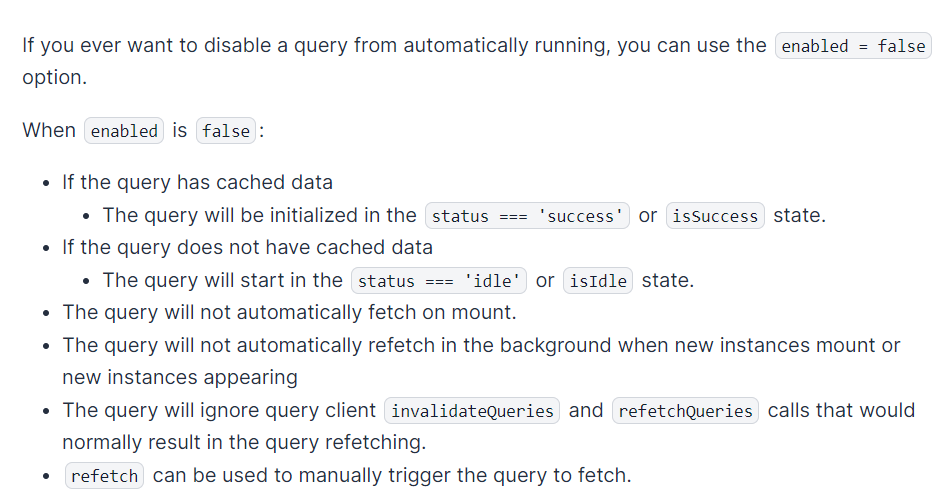
What is the use of enabled some may wonder? OK so enabled allows us to conditionally render a hook. This means that suppose we have a state variable dhruv. We want the useQuery to do its work only when dhruv is true. In that case we can write enabled:dhruv and whenever the dhruv is true then the useQuery hook will work completely normal but when the dhruv is false it will be in either idle or success state depending on whether it has cached data or not and in such a situation the useQuery hook doesnt perform its tasks.
How isLoading is important? Consider that you fetch the data using the useQuery hook then in that case as the fetcher function is a promise which is a part of the asynchronous world of javascript then even before the data is completely fetched the component will be mounted and if you try to display some property of the data object then it will given an error.In that case the isLoading variable that is returned by the hook comes handy.
Consider the below example:
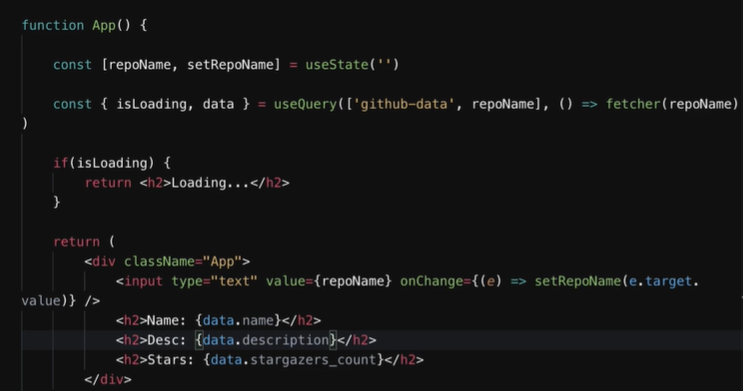
How caching is important? Ok so consider this example where we are fetching the data from an api by typing in the parameter. Ok so first time you type /dhruv and then the data is fetched. Now you change the parameter to /john and again the data is fetched. Now if you type /dhruv then the data related to it appears very quickly. This is the power of caching. It is not about the first request that makes the useQuery come handy it is about the consequent requests that you make.
Out of this blog: One can also pass whole functions inside the props and the function can be now received by the component and the component can call this function
useQuery can be used in multiple components
How to access the cached data? Ok so we know by now that useQuery caches the data internally for better performance . But suppose the user wants to access the cached query data then how can he/she do it? Using the client object
Remember we had a client object in the index.jsx file as let client=new QueryClient();
Let us create a new file queryclient.js in which has the following code:
import{QueryClient} from "react-query"; let client=new QueryClient();
export default client;
So now this client object can be accessed everywhere index.js, App.js etc...
Inside the App.js file if we write client.getQueryData(['post,5]) then it will give us an object which contains the cached data specific to the given key. The parameter inside the getQueryData function is nothing but the key that is specified inside the useQuery hook . Hence now we get access to the cached data. If the data is not cached then it will return undefined.
Cache time The third parameter in the useQuery hook which is an object can have another key which is the cacheTime
Let us take an example
let {data}=useQuery('dhruv',fetcher.{ cacheTime:100}
What this key does is that it determines for how much time the data should be stored in the cached before it can be removed. One thing to remember is that the data is still cached after the component goes to the inactive state.
Transform query result:
One can also transform the data we get from the useQuery hook using the select key
For example: let {data} =useQuery('dhruv',fetcher,{select:(res)=>return res.slice(0,6)};
So the select is basically a function which transforms the result of the query according to what is specified in the function. In this case it slices the data returned to only the first six elements and if we try to display the data only the first six elements will be displayed.
setQueryData
setQueryData is a synchronous function that can be used to immediately update a query's cached data. If the query does not exist, it will be created. If the query is not utilized by a query hook in the default cacheTime of 5 minutes, the query will be garbage collected. To update multiple queries at once and match query keys partially, you need to use queryClient.setQueriesData instead.
The syntax goes like this:
client.setQueryData(querykey,function to update)
This changes the cached data of the particular query in the client to the data that we set inside the function
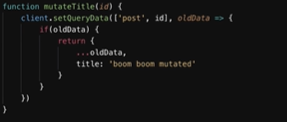
The problem with the above function is that the changes are made only for a fraction of second. To make the changes permenant what we can do is increase the staleTime to Infinity inside the useQuery
The staleTime basically means how long the data remains in the fresh state before it moves to the stale state. When the data is in the fresh state no refetching happens
Mutations
In the useQuery hook we are basically fetching the data from the server when the component is mounted. But in some practical life situations we need to only fetch the data when lets say a form is filled and sometimes we also need to mutate the data in the backend. In such cases the useMutation hook comes into picture
import {useMutation} from 'react-query';
The hook is used as follows: const mutation=useMutation(function);
The function returns a resolved promise.
How this works is that we have defined the hook. But the hook will not run immediately when the component is mounted. The function in the useMutation will only be called when we write:
mutation.mutateAsync();
The mutation process is an async function. We can also await on it if required.
Hence with this mutation process something is changing on the server and.
The useMutation does not have caching functionality because in this case it is not required in this case.
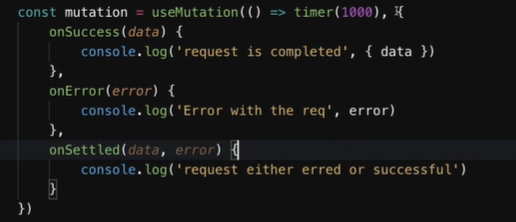
The callback functions or we can say sideEffects in the react useMutaton hook
These are all the major callback functions which may be called based upon which ever condition is satisfied. What we mean by that is if the data fetching or mutating is successful then onSuccess will be called otherwise onError will be called and so on..