Routing with react
What is meant by routing? Routing is basically a process in which a user is redirected or we can say moved to a different url based on their action or request.
For routing in react we have React Router. It is is one of the most popular routing frameworks for React. The library is designed with intuitive components to let you build a declarative routing system for your application.
The package we are using is react-router-dom
npm install react-router-dom
Now after installing the package we need to import some of the components
import {BrowserRouter,Route} from 'react-router-dom';
The BrowserRouter is a top level component inside which we can use the Route component .So basically the Route component has a path prop inside which we can specify the relative path of any other component.
Let us see an example:
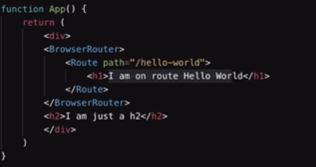
From the above image we can see that the Hello World can only be printed if we are on the path /hello-world
However if one goes to the route localhost:3000/hello-world it would give and error because in reality the backend server of the react js is not able to serve the index.html file for the /hello-world route
For that we can use the Link component to fake redirect it to the particular url
The Link tag has a to prop to which redirects it to the particular component
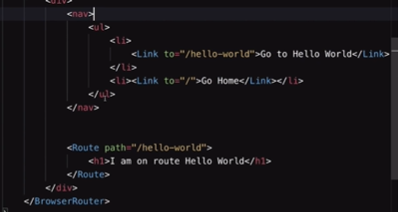
In the Route component always mention exact to make a strictly routing possible.
"Go to dhruv's home page"
We can also create dynamic routes where in the Route component looks like this:
Dhruv's id number
Ok what this does is that it creates a dynamic route wherein if any url if of the type lets say /dhruv/1 then it matches with the Route url and the the component present inside the route is displayed in the ui
The useParams hook
The useParams is a hook or we can say a function which can be imported from the react-router-dom package and the code is :
import {useParams} from 'react-router-dom';
Ok so the hook basically returns us the object which contains all the parameters of the path
For example if the path inside the route is /dhruv/:id and in the other component we first import the hook and then write
const {id} =useParams();
This basically returns the value of the id which is passed in the parameter